Friday, August 09, 2013

WHERE clause with multiple AND operators for the same column-[changed]

This relates to the earlier post. The developer wanted to eliminate those records if there are more than one MailGroup_FKey which satisfy the condition. So the SQL changed,

SELECT * 
FROM MailAddress_MailGroup
WHERE  MailGroup_FKey IN (
SELECT MailGroup_FKey FROM MailAddress_MailGroup
WHERE MailAddress_FKey IN (6,7) AND 
(SELECT COUNT(*) FROM (SELECT MailGroup_FKey  FROM MailAddress_MailGroup
WHERE MailAddress_FKey IN (6,7)
GROUP BY MailGroup_FKey
HAVING COUNT(*) = 2))=1
GROUP BY MailGroup_FKey
HAVING COUNT(*) = 2 AND COUNT(DISTINCT MailGroup_FKey)=1
) AND MailAddress_FKey IN (6,7)

Wednesday, August 07, 2013

WHERE clause with multiple AND operators for the same column


Here the developer wanted to pass n number of values for the MailAddress_Key column and return all the records which has all the values for the same MailGroup_FKey.

If values 6,7,1 passed, it should return all the records which satisfy that criteria if it's satisfied by individual MailGroup_Key(s). In the example MailGroup_FKey 2 and 3 both satisfy the criteria and it should return the relevant records of MailGroup_FKey 2 and 3

Here's the SQL

SELECT *
FROM MailAddress_MailGroup
WHERE  MailGroup_FKey IN (
SELECT MailGroup_FKey FROM MailAddress_MailGroup
WHERE MailAddress_FKey IN (6,7,1)
GROUP BY MailGroup_FKey
HAVING COUNT(*) = 3
) AND MailAddress_FKey IN (6,7,1)

Wednesday, December 19, 2012

Android: ListView custom layout with ImageButton of android:focusable="false"

Here I have customized the layout of a ListView. A ListItem is constructed by a TextView and a ImageButton. By default the ImageButton is invisible. I have OnItemLongClickListener implemented in the activity and make the button visible on onItemLongClick. Under the normal scenario everything works fine until you set the visibility to visible of the ImageButton. When you set the visibility to visible you won't be able to click on that particular ListItem anymore. 


This particular behavior is caused by the ImageButton. Reason for this is one particular property of the ImageButton which is android:focusable. By default this is true and you have to set this to false. But the tricky part is it doesn't work when you set the property in the xml layout as android:focusable="false". The Reason behind this is android:focusable gets overwritten and set to true by the ImageButton's constructor. So if you want to set android:focusable="false", do it in the java file instead of doing it in the xml layout file and you have to set android:focusable="false" in these kinds of situations otherwise you'll face the above mentioned (mis)behavior.

Friday, July 06, 2012

AJAX

AJAX - Asynchronous Javascript + XML

AJAX is not a one new technology or a language. It's just a way of using a set existing standards and technologies. It's all about updating a parts of the web pages by exchanging data with the server without reloadng(postback) the whole page. Rather than reloading the whole page parts of the web page does callbacks to the server. There are no any prerequisites (additional tools or software) to use AJAX in one of your web pages you just have to know how to write some code in javascript.

XMLHttpRequest(XHR) - API in web scripting languages such as JavaScript to send direct HTTP/HTTPS requests to the server and return the response back to the script.

The example below shows how to update a part of a web page without reloding the whle page(postback). The AJAX script or the code to implement the scenario 

is written in Javascript. 


Creating a XMLHttpRequest Object

xmlhttp = new XMLHttpRequest();

This is the basic syntax for creating a XMLHttpRequest object. This syntax might differ for older versions of some of the browsers.

xmlhttp = new ActiveXObject("Microsoft.XMLHTTP"); - for IE 5 and 6


Request

Request can be sent to the server by using open and send methods of the XMlHttpRequest object. 

xmlhttp.open("GET", "movie_catalog.xml", true);
xmlhttp.send();

There are 3 parameters passed to the open method.

method - Request type. This can be either GET or POST
url - Location of the file which is in the server where the response is returned from
async - asynchronous or not (true - asynchronous)


Response

There are 2 properties which can be used to get the response from the server.

responseText - when the response is in string format.
responseXML - when the response is in XML format.


onreadystatechange

A function can be stored in this property and it is called everytime when the readyState property of the XMLHttpRequest object changes.


readyState

This holds the status of the request object which ranges from 0 to 4
0: request is not initialized 
1: connection established to the server
2: request received 
3: request processing
4: response is ready


status

This holds standard HTTP status codes returned by the request
E.g:-
200: OK
403: Forbidden
404: Not Found


Example 1 : Get the content from a text file which is located in the server and display in a part of the web page.


Example 2 : Get the content from a XML file which is located in the server and disply in a part of the web page


Example 3 : Get the response another web page which is located in the server.


Thursday, July 05, 2012

ScriptManager.RegisterDataItem Method (Control, String)

How can you update a control which resides outside the update panel in an asynchronous post back?


You can use ScriptManager.RegisterDataItem to send data from the server to client whether the response control is inside the update panel or not. RegisterDataItem method can be called only during an asynchronous postbacks. The data item which is registered with the RegisterDataItem method can be accessed through the client script in  pageLoading, pageLoaded, and endRequest events of the PageRequestManager object. When you handle the event, custom data is passed in an event argument object. If you have a handler for pageLoaded event, customer data is passed in the PageLoadedEventArgs class which exposed dataitems property.


Wednesday, July 04, 2012

Named and Optional Parameters

Named and optional parameters have been there for Visual Basic for sometime but haven't been available in C# until the version 4 release. Name parameters allow you to pass parameters by the parameter names disregarding the order of parameters in the method signature. Optional parameters allow you to provide default values for some of the parameters in your method.


Named Parameters


Optional Parameters

Optional parameters allow you to provide default values for some of the parameters in your method and acts as a type of overloading. If you want to add one or more new parameter to one of your existing methods and you still need the existing functionality to behave as it is and the new parameters doesn't effect the existing functionality, the solutions is to repeat the same method with the additional parameters and a different method body. This is called overloading. 

If you use optional parameters for this purpose you can add the extra parameters as default parameters and handle those in the existing method body. You don't have to add a new method or modify the code where the existing method was called.


Monday, July 02, 2012

.Net: Instantiating


When instantiating classes, the class which is on the left side of the equation is called the declarative class and the class which is on the right side is called the instantiating class.


Base class called "Animal" contains 2 methods as

public void Eat()
public void Sleep()


Sub class called "Lion" which derived from "Animal" contains 2 new methods as
public void Hunt()
public void Walk()


When instantiating with base class as the declarative class and the derived class as the instantiating class, what will be structure of the instance? You'll see it carried 2 public methods of the base class. Actually this instance will carry all the methods, properties and variables from base class (according to encapsulation and other object oriented principles). This will not relevant if you override or shadow the base class methods.

Tuesday, June 26, 2012

SQL Server : How to escape single quote

Case : If you have developed a dynamic search by constructing a sql statement according to user inputs captured through several input controls in your application and one or more of those controls allow single quote as a part of the input string, your dynamically built sql statement will break in to several parts as a result of improperly formatted quote strings in the statement. The simplest solution is to replace the quote(') string with 2 quote strings('').


declare @find nvarchar(5);
declare @replace nvarchar(5);
declare @text nvarchar(100);


set @find = char(39);
set @replace = char(39)+char(39);
set @text = 'nalaka'+char(39)+'s';


set @text = replace(@text, @find, @replace)
set @text = 'select ''' + @text + ''' where getdate() = getdate()'
exec(@text)

Wednesday, July 06, 2011

Undo a check out being done by another user

You may come across situations where you want to undo or check in a change done by another user from his work space. This might be because that user has left the organization and you can't log in to his work space, or the user has re-installed the machine and no longer using the previous work space etc...

In earlier versions(Microsoft Visual Source Safe) you can achieve this by logging in from the Admin account and undo other's changes as the Admin. But the Visual Studio Team Foundation Server, you don't have the GUI to achieve this. So you'll have to use the Visual Studio Command Prompt.

You just have to do is Open the Visual Studio Command Prompt (no need to log in to the Team Foundation Server), and provide the relevant command. You have to specify few parameters to the command and they are;

- Operation needs to be done (e.g:- undo, check out, etc...)
- Work space and the user name of the user who has checked out the item.
- Location/path of the item which in being checked out.

Herewith I have attached a screenshot of the command in my case.


Cheers!

Thursday, September 02, 2010

Using Microsoft Data Access Application Block

Information access has become a major part when you are designing current day applications. There are fair reasons for this because you may live in a agile world or you have to be part of it. In that case time will be the most critical factor. In the other hand you'll have to consider the performance because it will be one of the most important factors when defining the success of your project or application. The bottom line is you have to invest minimum development time to gain a fair amount of performance when designing you application.

Fortunately I was not forced to agile process by my current environment but when I was designing the Data access layer of my new project, I was thinking about these 2 factors and finally decided to use Microsoft enterprise data access application blocks when designing the data access layer. I don't expect to talk about the advantages of enterprise data access application blocks or compare it with other technologies in this post but main points are it doesn't have performance issues in LINQ to SQL or EF like so much of cost/time it takes to view generation. Anyway according to my experience using an ORM reduces your development time but it gives you other headaches like performance issues and less flexibility when it comes to maintenance in the long run.

Enterprise data access application block is a well-tested data access layer. It manages the database connections pretty well and it doesn’t have any memory leaks so it's performance is quite good and It's easy to integrate to your application. Most of all with entlib 5.0 provides some ORM like features.


How to use Enterprise data access application block in your application

You can download the enterprise application blocks from codeplex. Then refer it in your application. Use the configuration tool or just add the relevant entries to web.config.


Now you can create an instance from Database class in entlib. This class consists of all 4 major methods you need to do database calls (ExecuteDataSet, ExecuteNonQuery, ExecuteReader, ExecuteScalar). You can execute SQL statements or stored procedures by using each of these methods.


Executing SQL statement


Executing Stored procedures


Here you don't need to specify the parameter types or names. You just need to pass the parameters to the stored procedure. Only thing you need to make sure is you need to pass the parameters according to the order they are declared in you stored procedure.


Execute stored procedures with output parameters


Those are the classic methods to execute sql statements or stored procedures but with entlib version 5.0 I have noticed 2 new methods called "ExecuteSprocAccessor" and "ExecuteSqlStringAccessor" where you can return user defined element type record sets which make it more interesting to use entlib DAAB. Here I'll explain how to use these 2 methods.


Accessor Methods

First you need to define an entity with properties which needs to be mapped with your table fields.


Write a stored procedure to retrieve data


Use the "ExecuteSprocAccessor" method to retrieve a list of users.


or use the ExecuteSqlStringAccessor method

Monday, June 07, 2010

SQL Server 2008 Management Studio installation failed

I just wanted to install SQL Server 2008 Management Studio on my notebook. I couldn't complete the installation at once since one of the setup rules were started to fail over and over.

I've done this installation numerous times in the past but as I remember I never came across this kind of an issue. I couldn't continue the installation since one of the setup rules were started to fail. Simply the setup couldn't restart the computer. I restarted the machine couple of times but It didn't do any change. Then I realized(assumed) system needs a reboot but it couldn't complete the job it needs to be done in the reboot. So when I do a search regarding the operations need to be done in the reboot, I came across this registry key.
HKEY_LOCAL_MACHINE\SYSTEM\CurrentControlSet\Control\SessionManager\PendingFileRenameOperations
Clearing the values in this key resolved the problem for me.

Value of this entry holds the filenames until the system reboots and they'll be renamed. These entries are not created by the operating system.

There is a cool link regarding this topic.

Wednesday, June 02, 2010

Extending the .Net Menu Control

This is a cool trick that you can use to extend existing script libraries that do not have the built in extensibility features.

In one of the ASP.Net 2.0 projects I was using the ASP.Net menu control. ASP.Net menu control is a cool control with hell a lot of features and flexibility but I couldn't fulfill the need by using any of those.

When you go(mouse over) to a menu item in the menu control, it highlights the menu item. But when you navigate to the next level(sub menu) of the menu, highlighted menu item in the previous level will lose the highlighted characteristic. So if you have a quite big or a menu which has couple of levels and if you are in the menu item which belongs to a latter level of the menu control, you might not know the path of the menu. Bottom line is path of the menu item should keep highlighted(hovered) so the user can see the path by the highlighted menu items. The task was challenging because I could not find a built in feature or an extensibility hook in the menu control itself.

I was looking for the options to extend the control but menu control does not have client side object model or any support from DHTML side of the things which allows the extensibility. When I dig more into the problem I got to know that DHTML object model is just a big freaking hash table and interception will be a way to achieve flexibility/extensibility.

So the basic idea behind the solution is in the javascript interpreter, everything from objects to functions is an entry in the globally defined dictionary. Because of this structure and the fact that javascript is loosely typed, you can substitute anything with anything else. So the inject point of the extensibility of the menu control will be the DHTML portion of the menu control. i will store some of the built in javascript functions in to variables and then set my own functions to those built-in functions. Then I will call the built in function from my own functions then do the rest I need. Actually I'm overriding the built-in function. What a cool way to entend the control.

Then comes the next problem. How do I know the functions I need to override? This is bit cumbersome in ASP.Net 2.0 because of the way it stores and sends stylesheet and javascript files to the browser. I had to open the page source and get the reference to a webResources.axd file. By copying and pasting this reference into the browser, I was able download the stylesheet or javascript file that's being referred.

After downloading the relevant javascript file associated with the menu control, I see the 2 functions I want to intercept.
Menu_HoverDynamic - This is the function that calls when you move the mouse over a menu item
Menu_Unhover - This is the function that calls when you move the mouse off a menu item

Algorithm is pretty simple to retain the "hovered" characteristic in the parent menu item. I used a built-in javascript function in menu control. In mouse over event it finds the item's parent menu item and fires the "mouseover" event of that parent menu item as well. Conversely, when the user moves the mouse off the menu items, it finds the parent menu item of it and fires the "onmouseout" event on that parent menu item. There is no need of any recrusive processing thanks to event bubbling mechanism provided by the DHTML DOM.

The final code follows.


1: <'script' type="text/javascript" language="javascript">
2:
3: var fw_Menu_Unhover;
4: var fw_Menu_HoverDynamic;
5:
6: function SetupInterceptors(){ // called by onload event
7: fw_Menu_HoverDynamic = Menu_HoverDynamic;
8: Menu_HoverDynamic = my_Menu_HoverDynamic;
9: fw_Menu_Unhover = Menu_Unhover;
10: Menu_Unhover = my_Menu_Unhover;
11: }
12:
13: function my_Menu_HoverDynamic(item) {
14: fw_Menu_HoverDynamic(item);
15: var x = Menu_FindParentItem(item);
16: if(x && x.tagName.toLowerCase() != "body")
17: x.fireEvent("onmouseover");
18: }
19:
20: function my_Menu_Unhover(item) {
21: fw_Menu_Unhover(item);
22: var x = Menu_FindParentItem(item);
23: if(x && x.tagName.toLowerCase() != "body")
24: x.fireEvent("onmouseout");
25: }
26:
27: <'/script'>


Here it goes. My custom functions replace the menu control's built-in functions and provide the desired result.

Thursday, May 06, 2010

nigella.com has selected to the 101 most useful websites


nigella.com has selected to the 101 most usable web sites by daily telegraph. You can read the full story http://www.telegraph.co.uk/technology/3356874/The-101-most-useful-websites.html

Tuesday, March 23, 2010

Passing a string of IDs to a WHERE IN clause

Scenario: There is a stored procedure that accepts a comma separated string of Ids as ‘1589, 1586, 1587’.


Stored procedure:

CREATE PROCEDURE [dbo].[Employee_GetByIds]
@IDs VARCHAR(1000)
AS
BEGIN

-- SET NOCOUNT ON added to prevent extra result sets from
-- interfering with SELECT statements.
SET NOCOUNT ON;

SELECT Id,FirstName, LastName, Address, Phone FROM Employee WHERE Id IN (@IDs)
END


Issue: application threw an error since the Id field of the Employee table is in the type of int but the parameter (@IDs) is with the type of varchar. From our application where pass the string of ID list will be something like ‘1585,1586,1587’. So we have to hold this value in a string type variable and pass the value to the stored procedure. Stored procedure accepts the value as a varchar type parameter but it uses it in a int type field. That’s where the problem arises.

Solution: Use a table-valued function to insert the list of IDs to a table and use the function within the stored procedure to select the list of IDs from that table instead of comparing the raw ID list.


Splitter function that inserts the list of IDs to a table:

ALTER FUNCTION [dbo].[Splitter] (@IDs VARCHAR(100) )
RETURNS @Tbl_IDs TABLE(ID INT) AS

BEGIN
-- Append comma

SET @IDs = @IDs + ','
-- Indexes to keep the position of searching

DECLARE @Pos1 INT
DECLARE @pos2 INT

-- Start from first character

SET @Pos1=1
SET @Pos2=1

WHILE @Pos1 < LEN(@IDs)
BEGIN
SET @Pos1 = CHARINDEX(',',@IDs,@Pos1)
INSERT @Tbl_IDs SELECT CASE(SUBSTRING(@IDs,@Pos2,@Pos1-@Pos2) AS INT)
-- Go to next non comma character

SET @Pos2=@Pos1+1
-- Search from the next charcater

SET @Pos1 = @Pos1+1
END
RETURN
END


Stored procedure has been altered to use the list of IDs converted to a table value by the splitter function:

ALTER PROCEDURE [dbo].[SourceDocument_GetByIDs]
@IDs VARCHAR(1000)
AS
BEGIN

-- SET NOCOUNT ON added to prevent extra result sets from
-- interfering with SELECT statements.
SET NOCOUNT ON;

Id,FirstName, LastName, Address, Phone FROM Employee WHERE Id IN (SELECT ID FROM Splitter(@IDs))
END

Sunday, March 21, 2010

Application Domain

One of the badly behaved DLLs/components of your application can bring your whole application or everything else down. One of the things we can do to resolve this issue is isolate the DLL/component from everything else. What does this isolation means? In pre-.Net days this only means isolating the code through processes.

If you don’t put an extra effort to isolate the components in your application, when you run the application, your whole application will run within a context of a single process. Since windows isolates process from each other through memory address, it’ll share the same memory space. All the components in the application have access to this common memory space shared though out the application. Because of this, a badly behaved piece of code can bring the whole application down.


How can you isolate processes? In pre.Net days COM is one of the technologies that enabled you to isolate processes by allowing a process to call a COM component which is an executable. But the main disadvantage of this method is since the processes can’t share memory or use the same address space, a complex marshalling process has to be used to copy data between the processes. Tough processes are great by considering security, the disadvantage is the performance. Because often number of processes will normally working together and you have to develop data marshalling processes to ensure the communication between those.

So the two main problems need to be addressed were the isolation of the processes and to ensure the marshalling process between processes to copy data between them.


In .Net, application domains are designed in a way that separating the processes without resulting performance problems with passing data between them. The whole idea behind applications domains are a process can be divided in to several application domains(containers). Most probably application domain corresponds to single application. Even though there are different executables, if they are running in the context of the same process, theoretically they can directly see each other’s data and it should share the same address space. But CLR makes sure that it does not happen. .Net Remoting is one of the areas application domains come in to action.

Tuesday, March 09, 2010

81st Battle of the maroons created the history in sri lankan sports

81st Battle of maroons made another memorable moment in sri lankan sports history by introducing a RF ID for the first time in a sporting event. Spectators were given a RF ID instead of conventional tear off tickets. The gates were equipped with the readers and the movements of the spectators will be monitored as the move in and out though the gates. This will streamline the ticketing process in future. Credit should go to the Battle of Maroons joint committee IT team for designing and implementing the system.

Wednesday, February 03, 2010

SQL Server structure change scripts

I've been doing re-engineering work of a project for the past couple of months. It's bit difficult to do re-engineering work rather than doing sometihng from the scratch because you'll have a hell of lot of limitations while doing re-engineering work.

These re-engineering work included some database changes like adding relationshipes among tables, changing datatypes, lengths of existing columns. Since the project is in the production enviornment I wanted to do these changes without effecting or dropping existing data in the database. I've used couple of tools.

When you are doing changed to the database objects. As an example when you are changing the datatype of an existing column you can generate the alter script for that change. it will create the alter script without effecting your data.

Step 1 : Changing the datatype of the column RegisteredDate from datetime to smalldatetime


Step 2 : Before saving the table design, right clink on a column and click on Generate Change Script...
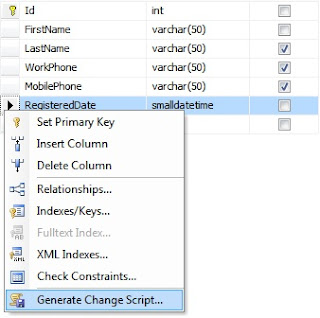


Step 3 : You'll see the change script on a popup window


Analyze the genereted script

/* To prevent any potential data loss issues, you should review this script in detail before running it outside the context of the database designer.*/
BEGIN TRANSACTION
SET QUOTED_IDENTIFIER ON
SET ARITHABORT ON
SET NUMERIC_ROUNDABORT OFF
SET CONCAT_NULL_YIELDS_NULL ON
SET ANSI_NULLS ON
SET ANSI_PADDING ON
SET ANSI_WARNINGS ON
COMMIT
BEGIN TRANSACTION
GO
CREATE TABLE dbo.Tmp_Customer
(
Id int NOT NULL,
FirstName varchar(50) NOT NULL,
LastName varchar(50) NULL,
WorkPhone varchar(50) NULL,
MobilePhone varchar(50) NULL,
RegisteredDate smalldatetime NOT NULL
) ON [PRIMARY]
GO
IF EXISTS(SELECT * FROM dbo.Customer)
EXEC('INSERT INTO dbo.Tmp_Customer (Id, FirstName, LastName, WorkPhone, MobilePhone, RegisteredDate)
SELECT Id, FirstName, LastName, WorkPhone, MobilePhone, CONVERT(smalldatetime, RegisteredDate) FROM dbo.Customer WITH (HOLDLOCK TABLOCKX)')
GO
DROP TABLE dbo.Customer
GO
EXECUTE sp_rename N'dbo.Tmp_Customer', N'Customer', 'OBJECT'
GO
ALTER TABLE dbo.Customer ADD CONSTRAINT
PK_Customer PRIMARY KEY CLUSTERED
(
Id
) WITH( STATISTICS_NORECOMPUTE = OFF, IGNORE_DUP_KEY = OFF, ALLOW_ROW_LOCKS = ON, ALLOW_PAGE_LOCKS = ON) ON [PRIMARY]

GO
COMMIT


If you analyse the generated script, there are 4 major operations.

1. create a temporary table with the new column definitions.
2. Inserts data to the temporary table from the existing table.
3. Drop the existing table
4. Rename the new/temporary table to the name of the existing table.

So you won't lose any data.

This is a feature provided by SQL Server but you can download this database publishing tool as a separate software.

Monday, September 15, 2008

What is LINQ?

One of the few things I had to use more frequently in last few days is LINQ. Although LINQ is not a new topic I had to use it more frequently so I thought to write something about LINQ including my experiences in it.

It's not been so long since Microsoft has included typed-dataset in Visual Studio 2005 as their latest information access method. It seems that the next big challenge in programming is to reduce the complexity and time of information access. If you want to develop a database application using .net simplest approach was to use ADO.Net. ADO.Net works as the middle ware of your application. It provides a complete object oriented wrapper around the database. To develop a database application using ADO.Net you have to have a good knowledge in SQL as well as programming concepts. Visual Studio 2008 comes with the general purpose query facilities to .net framework which is applicable to various information sources not just relational data which is called Language-Integrated Query (LINQ).

LINQ provides a set of general purpose standard query operators to traverse, filter, order, etc... to facilitate those operations. It helps any .Net based programming language. These standard query operators are applicable to any kind of information source which implements the IEnumerable interface.

LINQ query/operators

string[] names = { "Ajantha", "Gayan", "Jennifer", "Leo",
"Nalaka", "Rasika", "Rajitha", "Randy" };

IEnumerable<string> query = from q in names
where q.Length == 6
orderby q
select q.ToUpper();

foreach (string name in query)

{
Response.Write(name + " ");
}

if you compile and run this code you'll see the output,
NALAKA RASIKA

There are 3 standard query operators used in this query expression. where, orderby, select. This query expression can be re-written as,

IEnumerable<string> query = names
.Where(s => s.Length == 6)
.OrderBy(s => s)
.Select(s => s.ToUpper());

This type of a query is called a method based query. Arguments passed to Where, OrderBy, Select operators are called lambda expressions which are piece of codes or much like delegates. It allows to write individual query operators and bind together with the dot(.).

Friday, May 30, 2008

DataTable.Rows.InsertAt(DataRow, Position)

I wanted to interchange row positions of some records in my data table. Actually I wanted to search some records and bring those records on top of the data table. So I wrote this piece of code.

DataRow[] foundRows = dt.Select("firstName+' '+lastName='" + SearchString + "'");

for (int i = 0; i <>

{
dt.Rows.Remove(foundRows[i]);
dt.Rows.InsertAt(foundRows[i],i);
}

I didn't see any wrong with this code so I debugged to test the code. what I was expected to get the selected records on top of the data table as first few rows but the output was not what I was expected. replaces first few columns showed as blank records. When inserting records through InsertAt method it has inserted blank columns. so I checked the data row (foundRows[i]) just before inserting to the data table through InsertAt method and it showed the values of the record properly.

Finally my conclusion was after Inserted the new record to the data table through InsertAt method, those records become blank records. So I changed the above code as,

DataRow[] foundRows = dt.Select("firstName+' '+lastName='" + SearchString + "'");

for (int i = 0; i < foundRows.Length; i++)
{
DataRow dr = dt.NewRow();
dr["id"] = foundRows[i]["id"];
dr["FirstName"] = foundRows[i]["FirstName"];
dr["LastName"] = foundRows[i]["LastName"];
dr["Title"] = foundRows[i]["Title"];
dr["Location"] = foundRows[i]["Location"];
dt.Rows.Remove(foundRows[i]);
dt.Rows.InsertAt(dr,i);
}


And it worked perfectly. I had to create a new data row, assign the selected data row to that and insert newly created data row to the data table.

Wednesday, May 28, 2008

Fuel hike

Diesel prices increased from Rs.80 to Rs.130. It's a 62.5 percent increase from the current prices. This increase of diesel prices will affect many industries in sri lanka. Bus fair increased immediately from 27.2 percent and it might rise again in next couple of days. This will be the most touching increase of fuel hike to sri lankan citizens in the recent history.

Recent hike in food and fuel prices is not limited to sri lanka. Countries in war zones like Somalia, Afghanistan and Haiti are already suffering from this problem. Now it will start to feel to sri lankan citizens also with this fuel hike.

Most of the economists say that this will be a year of very high expenditure. I hope the sri lankan government will take necessary actions to help sri lankan citizens to balance their weight of expenditure.